Everyone
Secure access
Sign in safely, without it becoming a chore.
- 01Create account
- 02Sign in & password reset
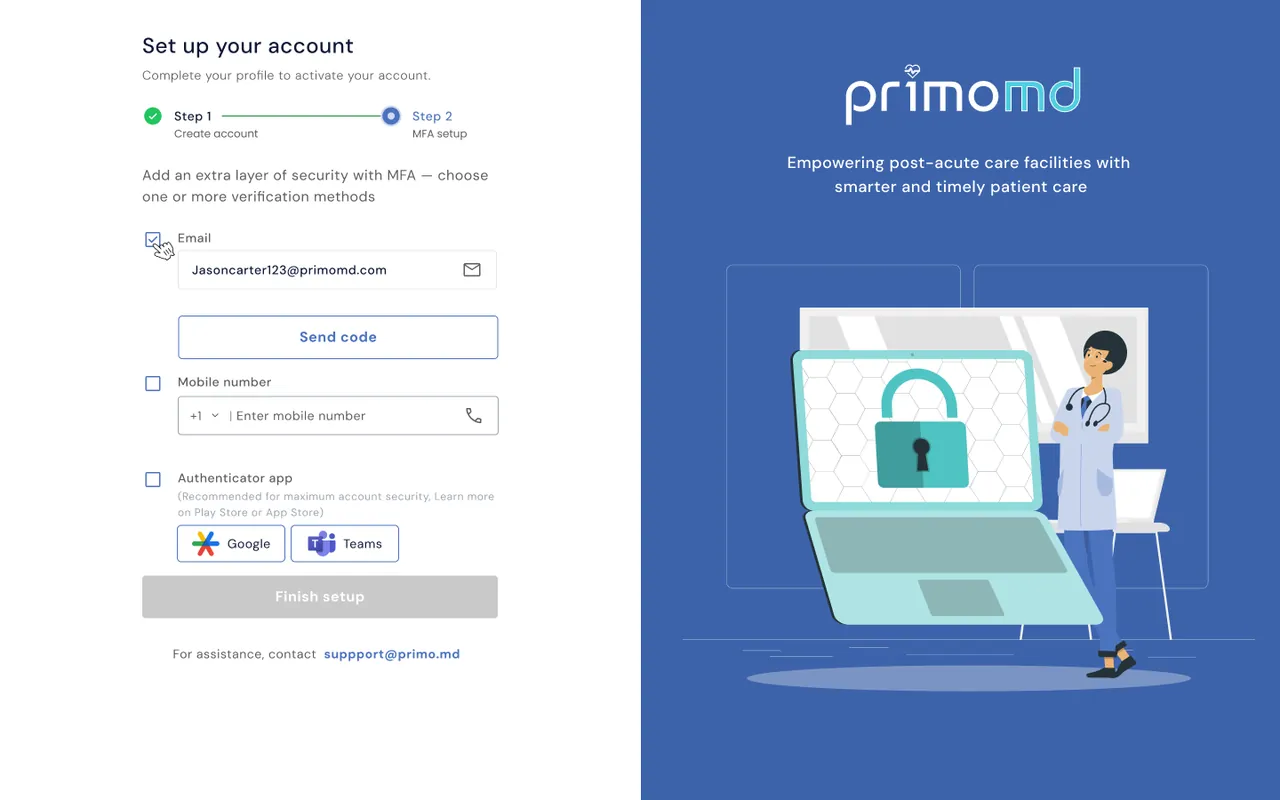
- 03MFA setup
- 04Sign in with MFA
Empowering post-acute care facilities with smarter, timely patient care.
A short film cut from the real PrimoMD screens, with generated ambient music. Names are sample data from the mock-ups.
One product, two roles: everything at once for coordinators, focus for liaisons.
Coordinators were planning a week of patient visits across many facilities, liaisons and providers, with no single view of what was pending, overdue or unassigned.
A web app with three planning views, flexible assignments that handle leave and conflicts, a risk-first patient list for liaisons, and secure sign-in with MFA.
Density vs. calm: coordinators need everything at once, liaisons need focus. We split the product by role instead of compromising one screen for both.
UX designer, end to end: flows, edge cases, visual design and the design system, across 13 flows.
Post-acute care depends on the right clinical liaison seeing the right patient at the right time. Behind that sits a weekly puzzle of facilities, patients, liaisons and providers.
Care coordinators had to plan the week, spot gaps and react when things changed: a liaison on leave, two visits clashing, a patient whose risk suddenly went up. Liaisons, meanwhile, needed a simple answer to “who do I see today, and who first?”. And because the product holds patient information, access had to be secure, without making every sign-in a chore.
Workload across facilities, and what’s pending, overdue or unassigned, wasn’t visible in one place.
Leave and scheduling conflicts meant assignments had to move quickly and safely.
Liaisons needed to spot high-risk patients instantly, and trust that the data was fresh.
…help coordinators plan and adjust a whole week of care at a glance, while giving each liaison a calm, risk-first list of who to see?
We started with the people doing the work: how coordinators plan a week today, and what a liaison actually needs on the floor.
The aim was to understand how coordinators and liaisons manage patient visits across facilities, where scheduling and communication break down, and how each role really works. The central question: how might we help coordinators manage complex schedules while helping liaisons prioritise visits, see clinical context and finish their work with confidence?
Operational goals and constraints
Scheduling, reassignment, workload
Prioritisation, visit context, documentation
Observe real workflows
Find fragmented processes
Validate core workflows
Plans the weekly schedule, balances workload across facilities, assigns and reassigns liaisons, and watches pending and overdue visits.
One view of the whole week, fast filtering, safe changes
Missing an overdue visit or double-booking a liaison
Visits patients across facilities. Needs to know who to see, who’s high risk, which provider is involved, and whether notes are done.
A short, prioritised list and quick status updates
Walking into a visit without the right context
Coordinators think in facilities and workload; liaisons think in patients and time.
Opportunity: role-specific views that share one scheduling source.
Clinical urgency can matter more than the order visits were booked in.
Opportunity: visible risk and priority filters, without opening every record.
Changes to assignments and notes affect decisions in real time.
Opportunity: last-updated labels, sync states and reassignment alerts.
Care coordination depends on shared information, timely risk context and reliable follow-up (AHRQ). The direction: one shared system, with an experience tuned for each role.
InsightDifferent mental models
InsightScheduling changes create complexity
InsightRisk informs visit order
InsightSchedules evolve
InsightDocumentation closes the loop
Instead of one “perfect” schedule, we explored how each role naturally slices the week, and designed a view for each.
We weighed a pure calendar (great for time, poor for workload), a pure table (great for scanning, poor for time) and a hybrid. The answer was to let coordinators switch lenses: a calendar for time-based planning, and tables for facility and liaison workload.
Clear for time slots and clashes, but hard to compare workload across 40 facilities.
Not enough on its ownFast to scan and filter, but loses the shape of the day and makes conflicts hard to see.
Not enough on its ownLiaison, provider and facility views, plus a calendar for scheduling. Each role gets the lens that fits the task.
ChosenWith up to 40 facilities and hundreds of patients, filtering had to be powerful but forgiving. We explored a single search, simple dropdowns, and a filter modal; we landed on quick filters for common cases, a modal for advanced ones, and chips so applied filters are always visible.
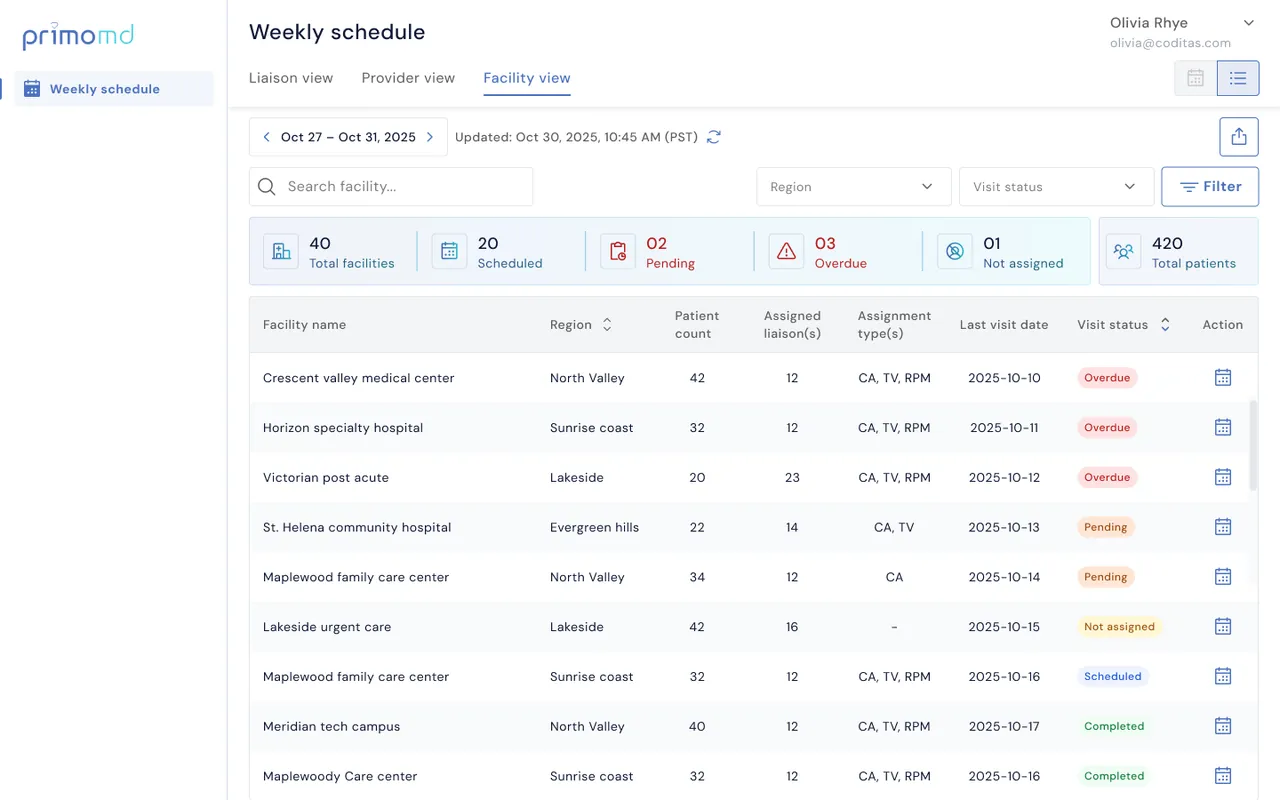
Every facility, every status, every liaison, visible without clicking.
A short, prioritised list of patients, with nothing extra in the way.
Rather than one compromise screen, the product splits by role. Coordinators get dense, switchable planning views with KPI summaries; liaisons get “My assignments”, a focused list sorted around risk.
The cost: two experiences to design and maintain. We managed that with one shared design system (tables, chips, filters, status colours), so both feel like the same product while doing different jobs.
Patient data needs strong authentication.
Busy clinical staff sign in often.
We made MFA mandatory but flexible: three methods, a recommended default (authenticator app), the option to pick a preferred method, and a “try another way” escape hatch.
Thirteen flows designed end to end. Switch to Long read for every flow, screen and edge case.
Thirteen flows, each mapped screen by screen with its edge cases: errors, empty results, expired links and conflicts.
Sign in safely, without it becoming a chore.
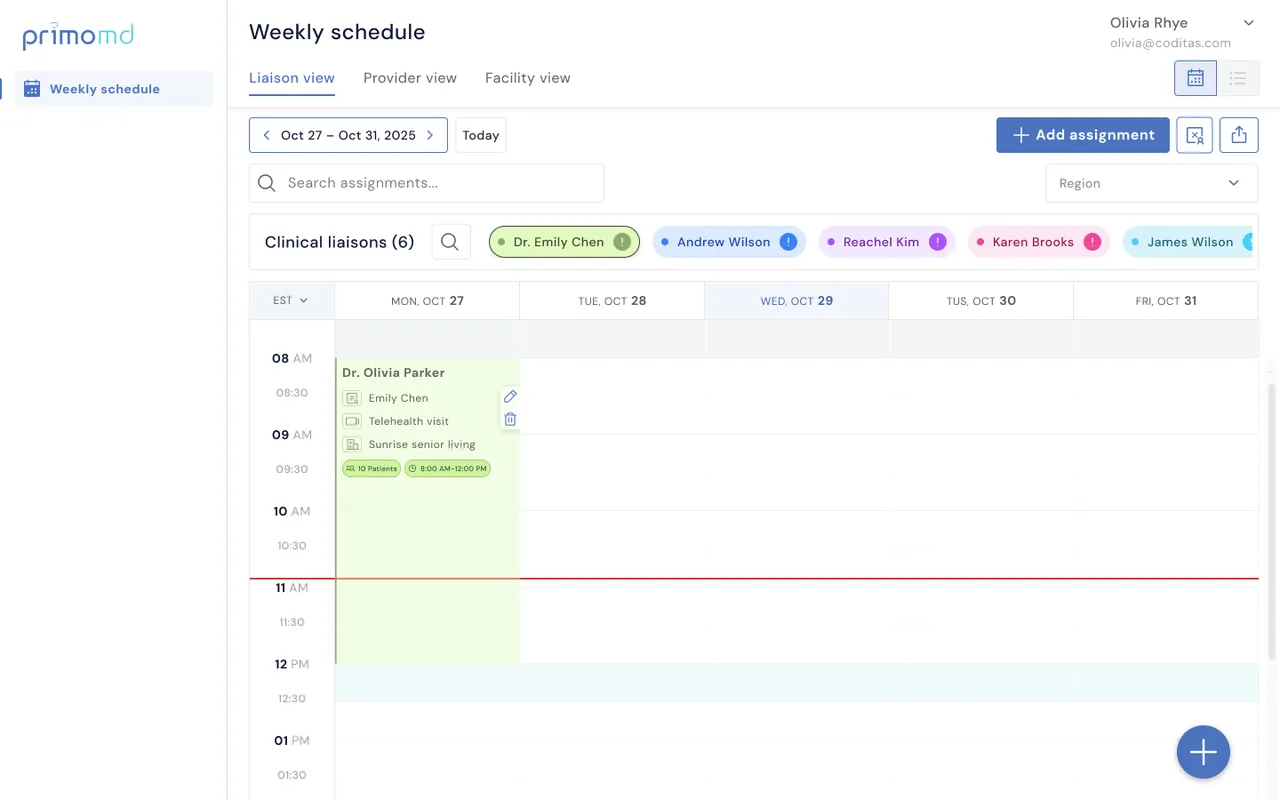
One view of every facility, and changes that don’t break the plan.
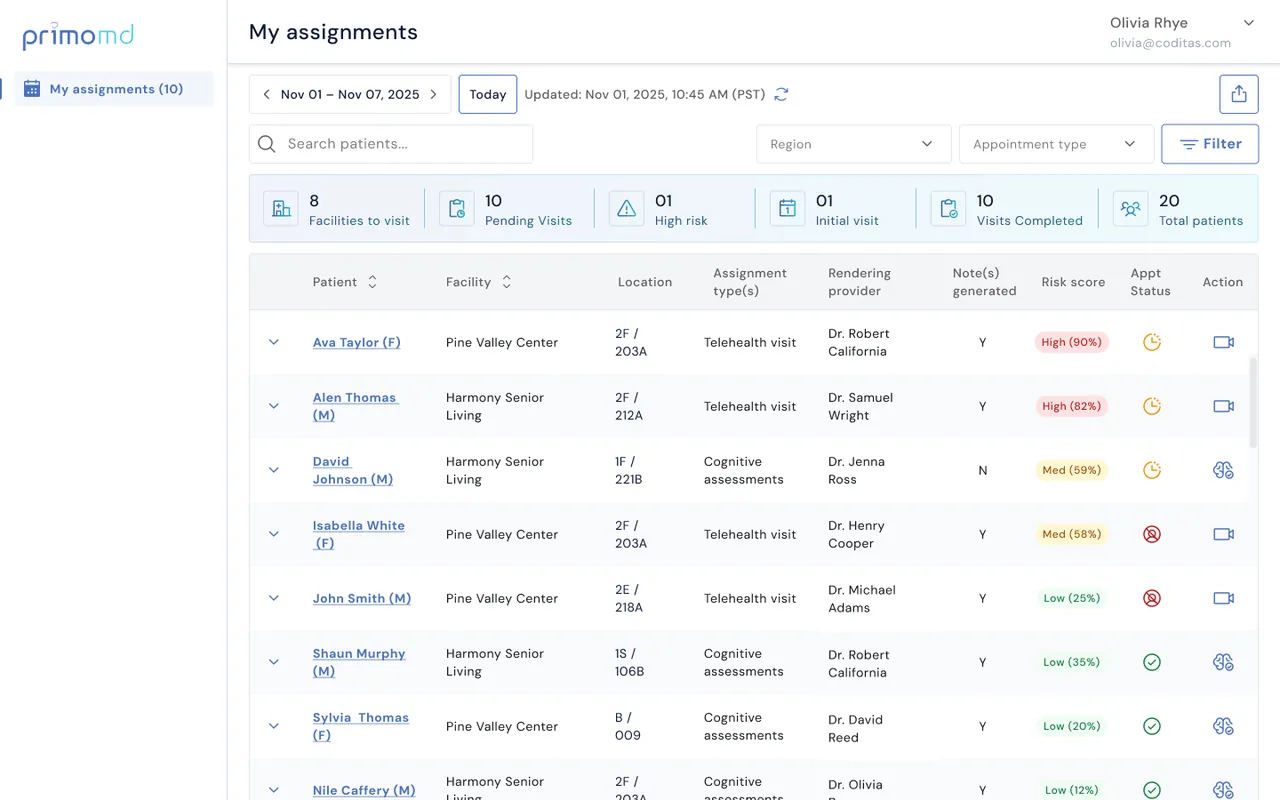
A short, risk-first list and quick status updates.
Eight flows from the final designs, screen for screen. Pick a flow, then click where the guide points. Turn the guided tour off to explore without hints, or use Next and the arrow keys.
Every screen is exported straight from the PrimoMD Figma file; the cursors visible in some screens are part of the original prototype. Names are sample data.
Invited users finish setup in two short steps, and every error tells them exactly what to do next.
123Coordinators get the same week three ways (by liaison, provider or facility) with the numbers that need attention up top.
 1234
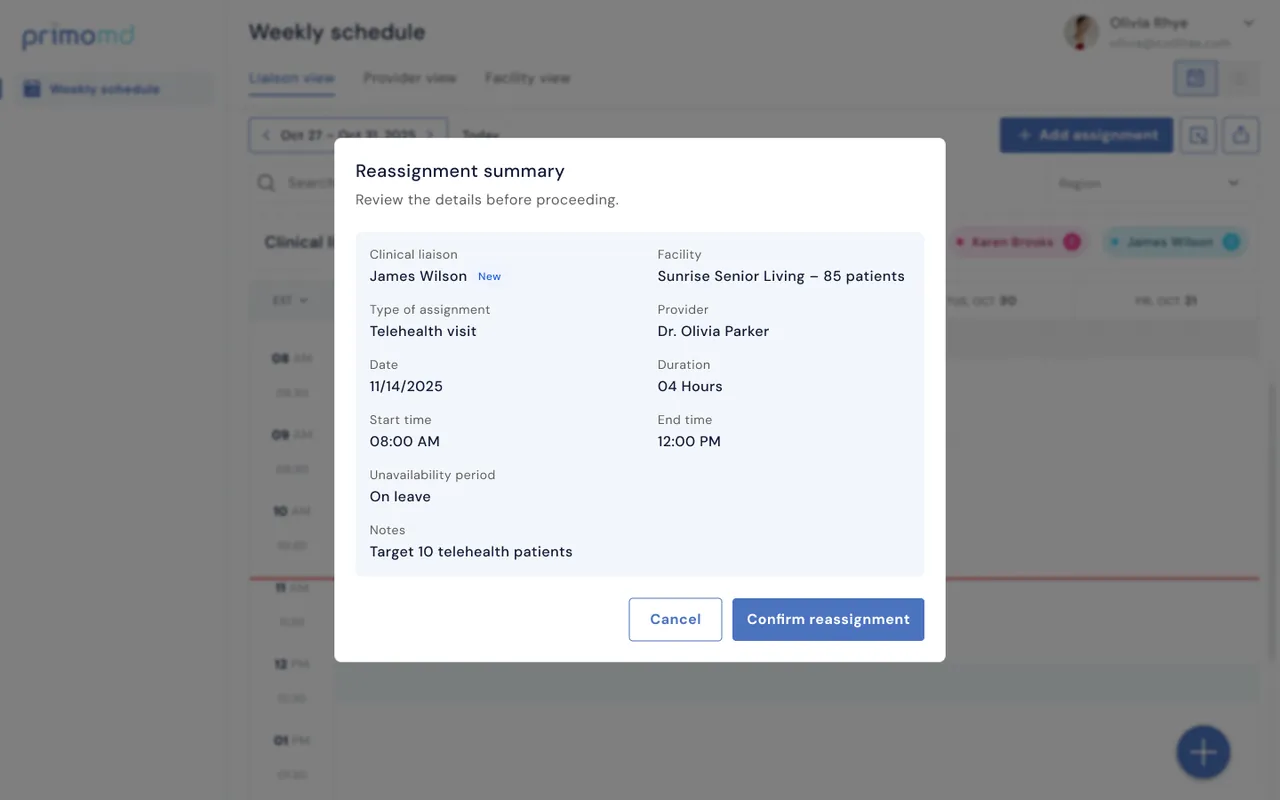
1234Leave and conflicts are part of every week, so changes are reviewed before they land and the reason travels with them.
 123
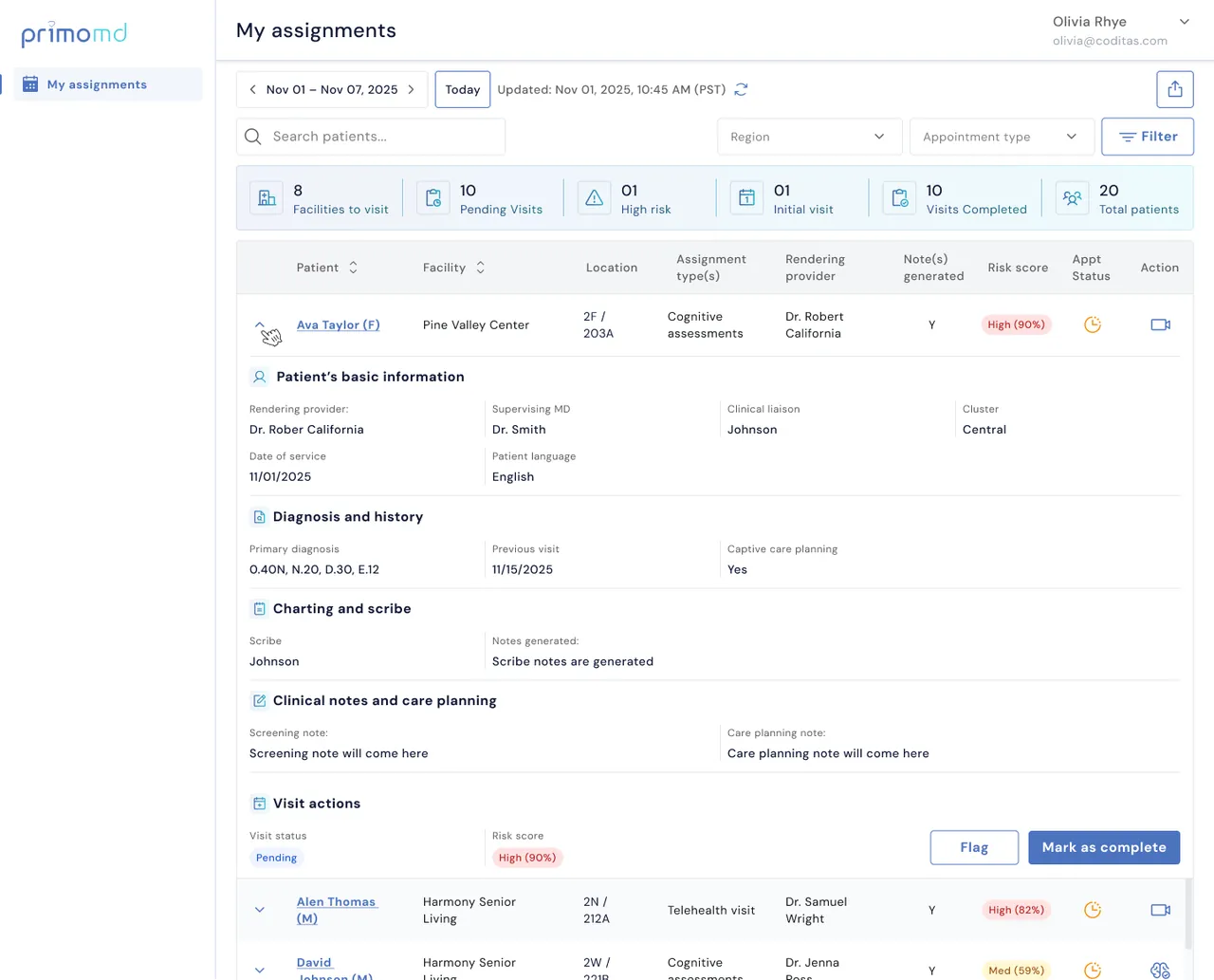
123Liaisons open a list sorted by risk, expand a patient for everything they need, and record what happened without leaving the row.
 123
123High, medium and low with the percentage, colour-coded, so liaisons can prioritise without opening anything.
Why: the first decision of a liaison’s day is “who first?”, so that answer belongs on the first screen.
Pending and overdue cards change state when they’re above zero, and stay quiet otherwise.
Why: if everything is highlighted, nothing is. Alert colour is saved for real problems.
An “Updated” timestamp with a refresh button sits on every planning view.
Why: coordinators act on the schedule in real time; they need to trust it before they change it.
Every active filter shows as a removable chip, with show more / show less and reset.
Why: hidden filters are the main reason people think data is missing.
Reassigning for leave or clashes shows the conflict first, then the fix.
Why: moving patient visits is high stakes; no silent changes.
Expired links, wrong codes, too many attempts, no results, empty states: all designed.
Why: in clinical tools, the edge cases are everyday cases.
We reviewed the designs screen by screen with the client team, walking through key workflows and edge cases to check usability, scheduling efficiency and clarity.
The reviews focused on how coordinators assign and manage visits, how liaisons spot priority patients, and how both roles respond to schedule changes. Feedback pointed to ways to improve navigation, cut unnecessary steps and make critical information easier to reach.
Screen-by-screen reviews covering scheduling, visit management and edge cases.
Collaborative reviews with project stakeholders. Testing with end users is the next step.
Proposed refinements to risk visibility, schedule changes and visit-status updates.
A care coordination platform that simplifies scheduling, makes patient visits easier to see, and supports two distinct healthcare workflows on one scalable foundation.
Scheduling, visit management and patient prioritisation now live in one structured experience. Coordinators manage workloads, liaisons reach the patient information they need, and a shared design system keeps it consistent as it grows.
Designed to reduce scheduling complexity, surface high-priority visits and make critical patient information easier to reach.To be added once verified with product analytics or client feedback.
Less average weekly planning time
Fewer missed or double-booked visits
Time to find and assign priority visits
% of coordinators and liaisons active
Task completion and satisfaction
The four numbers above describe design scope, not measured business impact.
Designing a care coordination platform reinforced that good UX isn’t just simpler screens. It’s understanding how different roles make decisions, carry responsibilities and depend on accurate information through their day.
Coordinators and liaisons work with the same information but very different priorities. Designing around each workflow made both experiences clearer than one shared interface could.
Scheduling conflicts, overdue visits, expired links and sign-in errors shape usability and trust. Mapping them early made the patterns more complete and resilient.
Polished screens are only part of the job. Success metrics like scheduling efficiency, task completion and fewer errors connect design to real operational gains.
I’d bring usability testing and success metrics in earlier, to validate assumptions sooner, prioritise by real behaviour, and tie design decisions to measurable outcomes.
Built on DM Sans, a deep blue primary and a bright cyan secondary, with clear success, error and toast colours for status.
DM Sans across headlines, body, captions and links.
A consistent grid and Phosphor icons keep dense tables aligned.
© 2026 Payel Ghosh · Designed with curiosity, tea and one very fluffy co-pilot